M5Stack Cardputer-Adv
CHIMERA
An offline voice synthesizer with a visible vocal tract. Type a phrase, press Enter, and watch the head animate as it speaks. Open Songs to play three public-domain melodies with the same voice engine.
Based on the original CHIMERA project by Jameson Hodge.
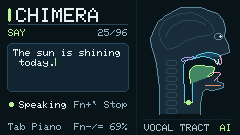
Hear Say mode
English phrases synthesized with the Cardputer-Adv voice engine.
-
“The sun is shining today.”
-
“Did you hear the bell ring?”
-
“She sells seashells by the seashore.”
-
“We have 3 stops before the train reaches the city.”
-
“In the morning, we opened the windows and listened to the birds outside.”
-
“When the lights go out, stay where you are and listen for footsteps coming down the hall.”
Install on Cardputer-Adv
The standalone image replaces the current firmware and partition table. Back up the device before flashing.
If the USB installer does not load, install from the command line.
-
Enter download mode
Turn the Cardputer-Adv off. Hold G0 while connecting it to your computer with a USB data cable. Release G0 once connected.
-
Flash the firmware
Click Connect and install, select the Cardputer’s serial port, then confirm. For manual flashing, download the firmware and follow the esptool instructions.
-
Type and speak
Restart the device, type an English phrase, and press Enter. Use Fn + − to lower volume and Fn + = to raise it.